Understanding latency
Latency is the delay between an action and what you hear or see. A drum setup has several independent delays:
- MIDI input: the module detects a strike and sends a message.
- Audio output: the browser schedules a click or sample and the audio device plays it.
- Monitoring: Bluetooth audio, an interface, mixer, or module adds its own path.
- Display: animation can trail audio and should not be used as the timing reference.
Rhythma’s Timing Alignment aligns scoring to what you hear and play on the current kit-profile/device setup. The Settings panel displays Timing offset, its source (Default, From setup estimate, From alignment, or Manual), and Output latency, which is detected automatically where the browser exposes it.
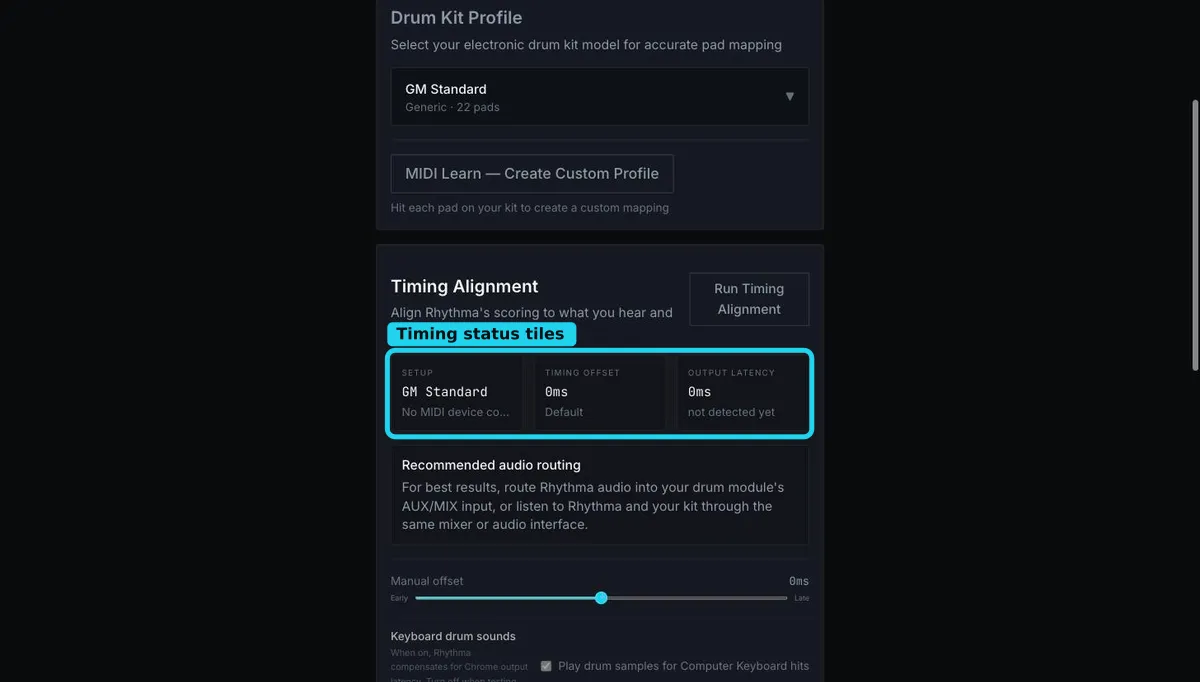
A negative/early or positive/late result is not automatically a playing fault. If nearly every otherwise steady hit leans the same way, align the setup. If results scatter on both sides, work on consistency or eliminate an unstable Bluetooth audio path.
Calibration cannot make delayed audio instantaneous; it compensates scoring. For the most natural feel, first build a low-latency monitoring path, then calibrate.
Still stuck? Email admin@rhythma.pro.
We use Google Analytics to understand how this site is used. See ourPrivacy and Cookies Policy.