Alesis
Connect the module’s USB-MIDI port directly to the computer, turn the module on, then choose Connect MIDI. Avoid an unpowered hub while troubleshooting.
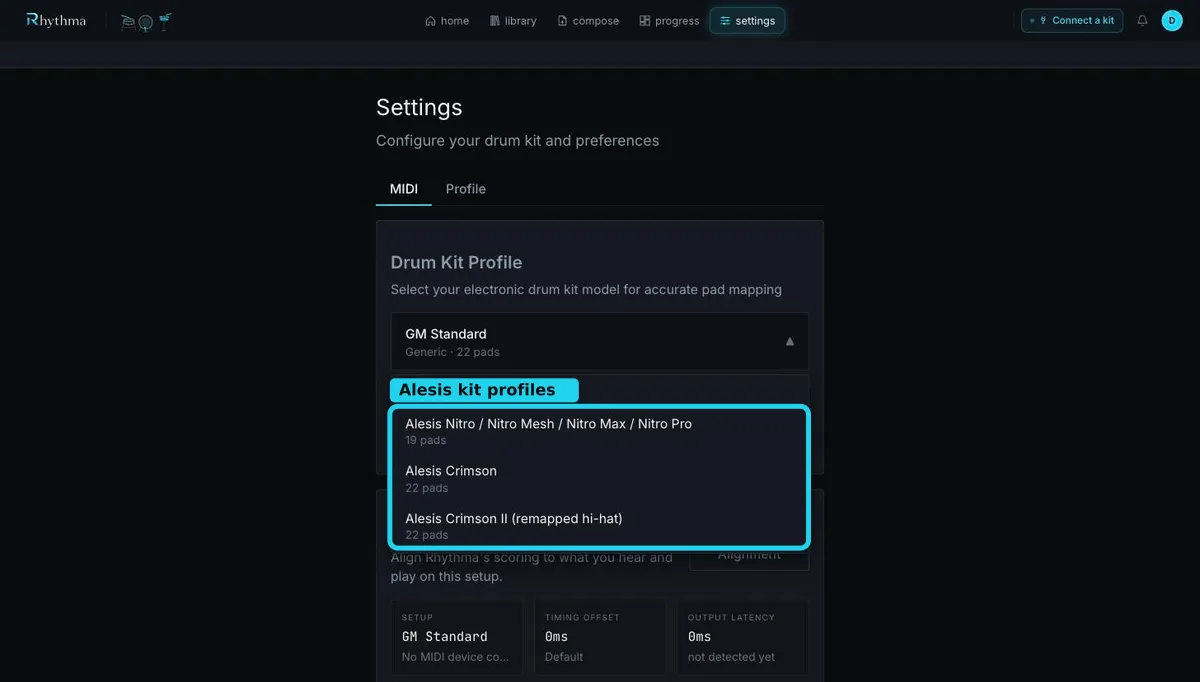
Under Settings → MIDI, choose the matching built-in profile. The verified choices include Alesis Nitro / Nitro Mesh / Nitro Max / Nitro Pro, Alesis Crimson, and Alesis Crimson II (remapped hi-hat). The Crimson II remapped profile exists specifically for its different hi-hat notes; try it before building a custom map.
Open MIDI Monitor and test kick, snare head/rim, closed and open hi-hat, pedal, each tom, crash, and ride. A correct hit displays its pad name and Mapped. Unknown (Note …) or Unmapped means the selected profile does not match what the module sends.
If notes were reassigned on the module, use MIDI Learn — Create Custom Profile. Follow the prompts and strike every supported zone distinctly. Crosstalk and double triggering are module-level trigger issues; lower crosstalk/threshold or adjust sensitivity on the module, then retest the same physical stroke in the monitor.
Still stuck? Email admin@rhythma.pro.
We use Google Analytics to understand how this site is used. See ourPrivacy and Cookies Policy.