Roland TD
Connect the module’s USB COMPUTER port directly to the computer where possible. On modules that offer a USB driver or vendor mode, install Roland’s current driver and select the module’s MIDI-capable USB mode; otherwise use the class-compliant/generic mode supported by your operating system.
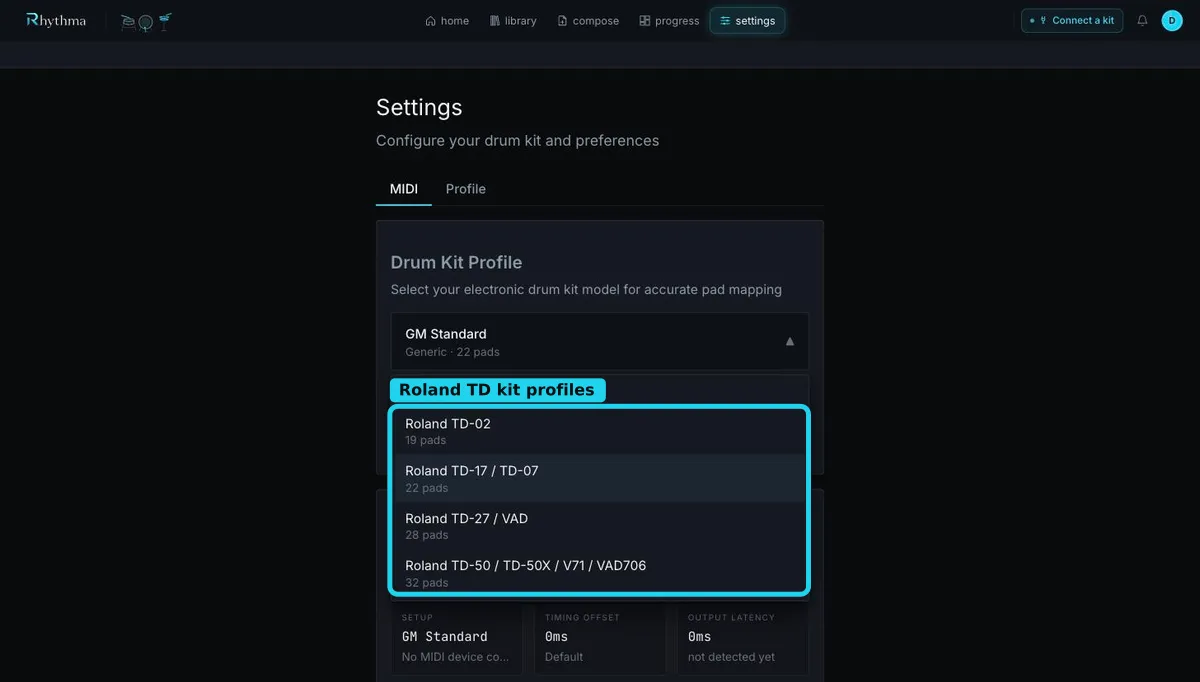
After selecting Connect MIDI, go to Settings → MIDI and open the kit selector. Rhythma includes profiles named Roland TD-27 / VAD, Roland TD-17 / TD-07, Roland TD-02, and Roland TD-50 / TD-50X / V71 / VAD706. Pick the closest exact module family, then verify the head, rim, hi-hat, and ride zones in MIDI Monitor.
If a customized module sends different notes, do not change pads blindly. Use MIDI Learn — Create Custom Profile, strike each requested zone, confirm the detected zones, and name the profile. If only one pad is wrong, use its re-learn control in the selected profile.
For reliable hi-hat openness, connect the controller pedal to the module and confirm it sends controller 4 data. If bow, edge, bell, or cross-stick zones share the same note, adjust the module’s trigger/MIDI assignments first.
Still stuck? Email admin@rhythma.pro.
We use Google Analytics to understand how this site is used. See ourPrivacy and Cookies Policy.