Editing
Compose editing is immediate: select cells to toggle hits, change a filled cell’s variant, and use bar navigation to move through longer patterns. Grid changes subdivision, Bars changes length, and Add Instrument adds available voices.
Use sticking and counting controls to label the exercise. Clear sticking and Clear counting remove only those annotations. Clear pattern removes the pattern content, so review the confirmation before continuing.
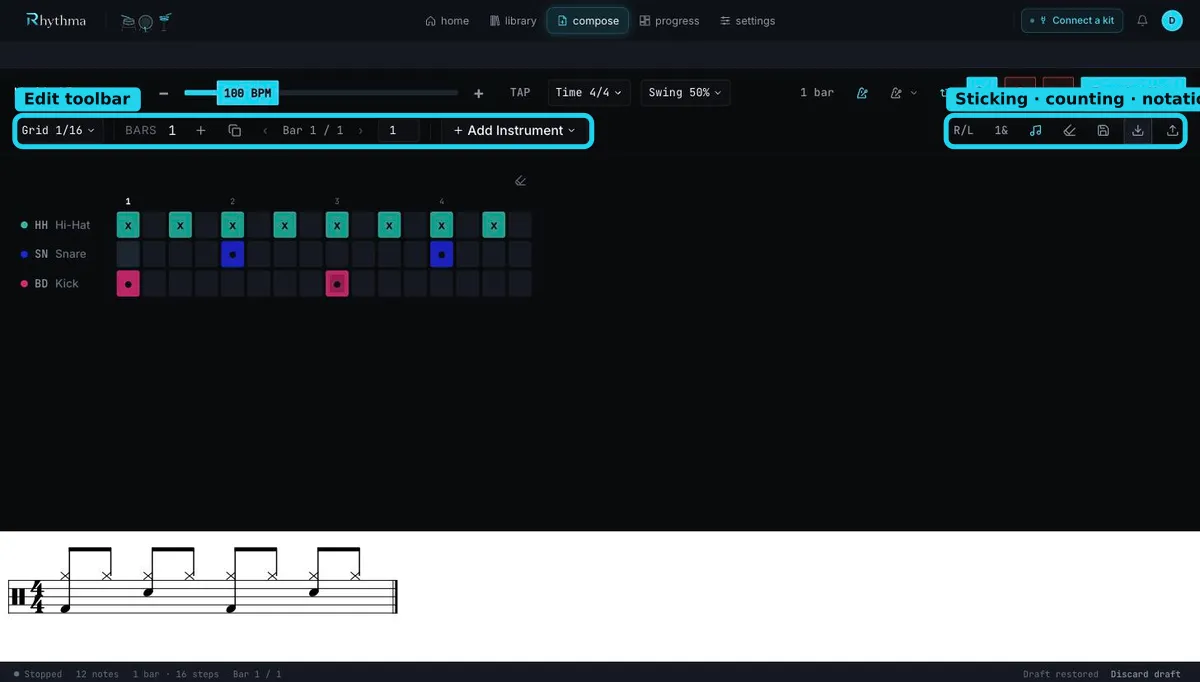
Editing a performance
Section titled “Editing a performance”Normal Record replaces the current grid after confirmation. Punch In is the overdub path: play additional notes over the looping pattern, or clear existing cells during the active take. The recording summary reports captured hits and detected flams or drags before the take is committed.
Stop playback or recording before changing timing structure. Controls that would invalidate an active take are intentionally unavailable until transport stops.
For large structural changes, set time signature, subdivision, bars, and swing before detailed cell editing. Changing those foundations later can requantize or remove steps that no longer fit.
Still stuck? Email admin@rhythma.pro.
We use Google Analytics to understand how this site is used. See ourPrivacy and Cookies Policy.