Composer basics
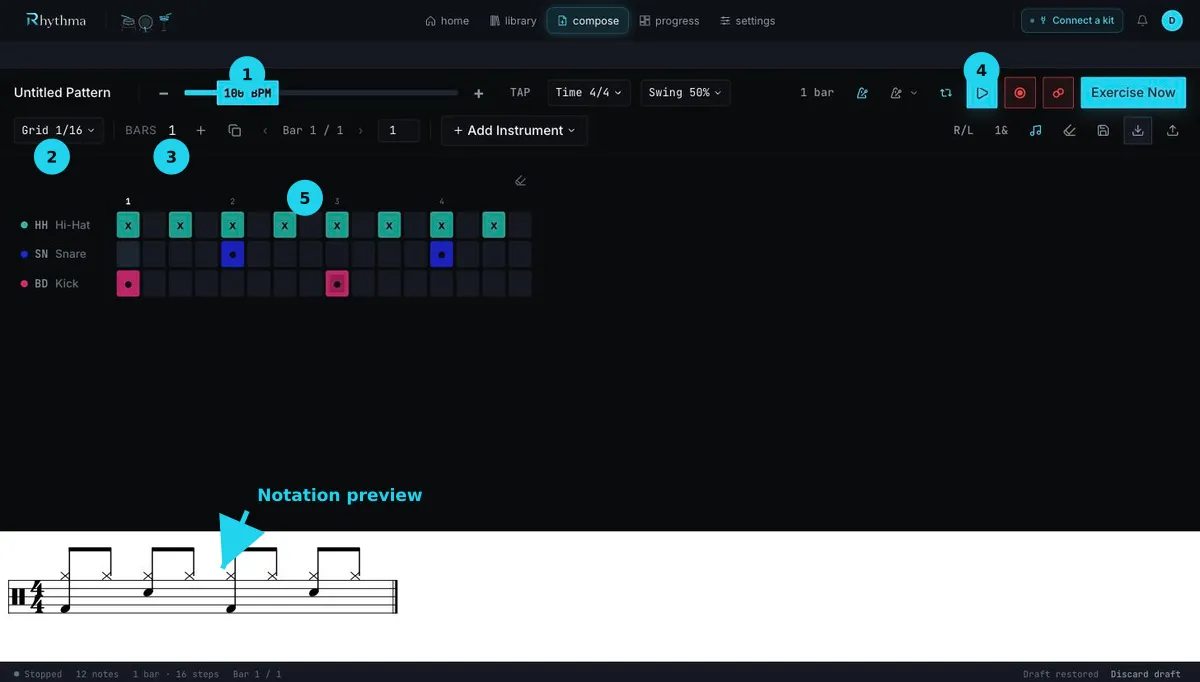
Open Compose to work in the drum grid. Rows are drum voices and columns are time steps. Select an empty cell to add a hit; select a filled cell to remove it. Use Grid to choose the subdivision and Bars to set the pattern length.
Set tempo with the BPM control or tap-tempo button. The time-signature and swing controls define the pulse and feel; available grid choices adjust to the time signature.
Hear or record the pattern
Section titled “Hear or record the pattern”- Play pattern starts playback; press the same control to stop.
- Toggle Compose loop playback repeats the grid.
- Start recording to Compose grid records a replacement take after the selected count-in.
- Punch In overdubs onto the current grid instead of replacing it.
- Run pattern as exercise plays once in the player without tracking progress.
Recording quantizes incoming MIDI to the current grid and can detect ornaments such as flams and drags. During replacement recording the grid is read-only; during active Punch In, existing cells can be cleared while new playing is captured.
Use the notation toggle to open Notation preview beneath the grid and check how the pattern will read.
Still stuck? Email admin@rhythma.pro.
We use Google Analytics to understand how this site is used. See ourPrivacy and Cookies Policy.