Notation and voices
Each Compose row represents a playable voice: kick, snare, hi-hat, tom, crash, ride, or an added instrument. Add Instrument shows optional lanes not already present. The grid’s abbreviated voice labels correspond to the notation and per-lane results, such as BD (kick), SN (snare), HH (closed hi-hat), HO (open hi-hat), HP (hi-hat pedal), CR (crash), and RD (ride).
A filled cell can carry a variant, including articulations or dynamic intent such as accent or ghost. Available variants depend on the row, so use the cell’s variant menu rather than assuming every voice supports the same technique.
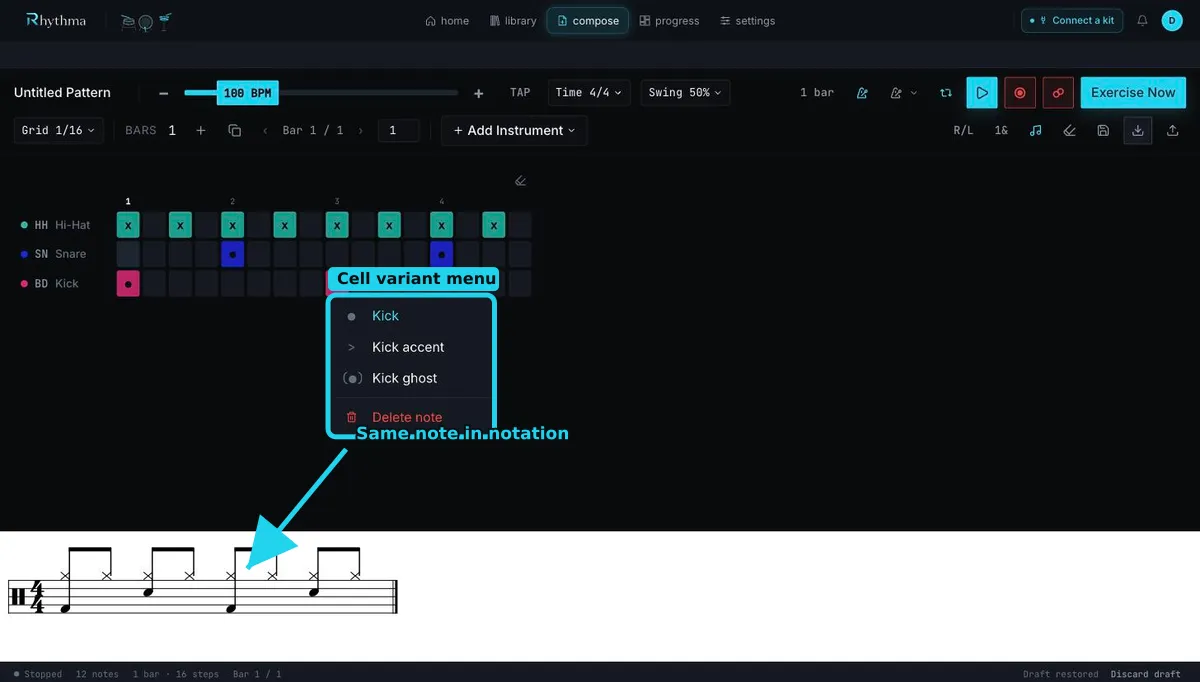
Open the notation disclosure to show Notation preview. It is a live rendering of the current grid and follows playback; it does not create a separate copy. Sticking and counting label controls add instructional annotations, and their Clear actions remove those labels without clearing drum hits.
If notation seems unexpected, first confirm the grid subdivision, time signature, swing, and voice/variant. A MIDI mapping problem belongs in Settings → MIDI; editing notation will not change which physical pad is recognized.
Still stuck? Email admin@rhythma.pro.
We use Google Analytics to understand how this site is used. See ourPrivacy and Cookies Policy.